Excavator: Difference between revisions
| [checked revision] | [checked revision] |
Pwnerdonor (talk | contribs) mNo edit summary |
No edit summary |
||
| Line 10: | Line 10: | ||
It can dig [[Stone]], [[Dirt]], ore, [[Sand]], and [[Coal]], and can even break tree branches. With Stone or ores, the Excavator must first break the blocks before picking up the pieces. | It can dig [[Stone]], [[Dirt]], ore, [[Sand]], and [[Coal]], and can even break tree branches. With Stone or ores, the Excavator must first break the blocks before picking up the pieces. | ||
Items can not be dumped from the Excavator directly into [[Stockpiles]] or any other storage. Doing this will simply try to place them on top of the Stockpile, which will create issues. | Items can not be dumped from the Excavator directly into [[Storage|Stockpiles]] or any other storage. Doing this will simply try to place them on top of the Stockpile, which will create issues. | ||
Digging with the Excavator will consume more fuel than when it is being driven. It does not appear the pollution rate increases during digging. | Digging with the Excavator will consume more fuel than when it is being driven. It does not appear the pollution rate increases during digging. | ||
Revision as of 10:20, 2 July 2024
Template:Infobox Item The Excavator is a vehicle used for digging. It is crafted at the Robotic Assembly Line.
It is fueled with Petroleum, Gasoline or Biodiesel.
Strategy
The Excavator requires roads that are 4 to 5 blocks wide to drive comfortably.
It can dig Stone, Dirt, ore, Sand, and Coal, and can even break tree branches. With Stone or ores, the Excavator must first break the blocks before picking up the pieces.
Items can not be dumped from the Excavator directly into Stockpiles or any other storage. Doing this will simply try to place them on top of the Stockpile, which will create issues.
Digging with the Excavator will consume more fuel than when it is being driven. It does not appear the pollution rate increases during digging.
Operating Instructions
While you are in the driver's seat, mouse over the "1" slot on your toolbar. This will display the operating instructions.
Press 1 to go from drive mode to digging mode. Pressing 1 when driving will instantly stop you, and lock your Excavator in place.
Drive mode controls
- W — Move Forward
- S — Move Backwards
- A — Turn Left
- D — Turn Right
- Mouse — Free look
Digging mode controls
- W — Raise Boom
- S — Lower boom
- A — Rotate left
- D — Rotate right
- Mouse — Free look
- Mouse left click — Dig
- Mouse right click — Drop item (whatever you have highlighted on your tool bar, press and hold to quickly empty)
- Mouse left click + Move mouse left — Close bucket
- Mouse left click + Move mouse right — Open bucket
- Mouse left click + Move mouse up — Extend boom
- Mouse left click + Move mouse down — Retract boom
Notes
- You can use WSAD keys and Mouse commands at the same time for maximum digging! Note that left click will always dig, so while moving your boom/bucket you can dig at the same time.
- Keep in mind it is a very heavy item to carry in your inventory at 30kg. If it gets stuck you can pick it up like a cart, but you have to have the weight to do so.
Crafting
Gallery
-
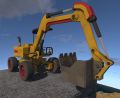 An Excavator
 -
 Two Excavators breaking and collecting Stone, Coal, and ore.


