Description
Use to create tiny icons (and captions). By default, the icon size is 28px but it can be re-defined.
Syntax
{{Icon|name|style|link|size}}
| Field
|
Accepted Parameters
|
Example
|
Notes
|
name
|
item name
|
Cooking
|
|
style
|
1,2,3
|
1
|
Defines the (caption) style. Default is a small icon that is unlinkable with no caption.
1 = outputs no caption icon2 = outputs the icon name as plain text next to the icon3 = outputs the icon name as a small caption below the icon
|
link
|
Page Name or 1
|
Charred Meat
|
Optional. Use if you want the icon to also link to a page.
- When set to the default of 1, it will link to the same name as the item, but you can overwrite by writing in the designated page name in this field. If you are using this, you must write out
link=
|
size
|
any px size
|
50
|
If you are using this, you must write out size= and assumes px.
|
Samples
| Example
|
Syntax
|
Result
|
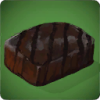
| Style 1, Size 100px, no link
|
{{Icon|name=Charred Meat|size=100}}
|
|
| Style 1, no Size, Link itself
|
{{Icon|name=Charred Meat|link=1}}
|

|

