Wooden Elevator: Difference between revisions
From Eco - English Wiki
| [checked revision] | [checked revision] |
No edit summary |
|||
| (3 intermediate revisions by 2 users not shown) | |||
| Line 1: | Line 1: | ||
{{ | {{ItemInfoCard}} | ||
==Gallery== | ==Gallery== | ||
Latest revision as of 16:51, 21 July 2025
Page name get test: Wooden Elevator
Item name get test: Wooden Elevator
 Wooden Elevator
An elevator for transporting loads vertically.
Crafted At:
| Crafting Table | Products | Ingredients | Craft time | Labor | Skill Requirements | Experience |
|---|---|---|---|---|---|---|
 Assembly Line Assembly Line | 00:10:00 | 500 |  Mechanics 1 Mechanics 1 | 15 |


For Sale
How use Icon:
Wooden Elevator icon can be used on any sign that has a text component, including on Vehicles:
Icon with background: <icon name="WoodenElevatorItem">
Icon without background: <icon name="WoodenElevatorItem" type="nobg">
Gallery
[edit | edit source]-
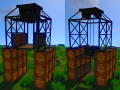 The Wooden Elevator placed on raised lumber blocks with the platform retracted (left) and descending (right).
 -
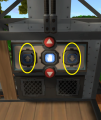 A screenshot of the Wooden Elevator control panel. Use the arrows circled to move the Wooden Elevator Up and Down.


