Store: Difference between revisions
From Eco - English Wiki
| [checked revision] | [checked revision] |
No edit summary |
No edit summary |
||
| Line 1: | Line 1: | ||
{{ | {{ItemInfoCard}} | ||
== Gallery == | == Gallery == | ||
Latest revision as of 19:16, 21 July 2025
Page name get test: Store
Item name get test: Store
 Store
Store
Allows the selling and trading of items.
Crafted At:
| Crafting Table | Products | Ingredients | Craft time | Labor | Skill Requirements | Experience |
|---|---|---|---|---|---|---|
 Workbench Workbench | 00:05:00 | 100 |  None None | 1 |


Used in:
| Crafting Table | Products | Ingredients | Craft time | Labor | Skill Requirements | Experience |
|---|---|---|---|---|---|---|
 Wainwright Table Wainwright Table | 00:02:00 | 225 |  Basic Engineering 1 Basic Engineering 1 | 10 |


For Sale
How use Icon:
Store icon can be used on any sign that has a text component, including on Vehicles:
Icon with background: <icon name="StoreItem">
Icon without background: <icon name="StoreItem" type="nobg">
Gallery
[edit | edit source]-
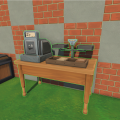 A placed Store.


