|
|
| (One intermediate revision by one other user not shown) |
| Line 1: |
Line 1: |
| {{Infobox_Item|name=Excavator}} | | {{ItemInfoCard}} |
| The [[Excavator]] is a [[Vehicles|vehicle]] used for digging. It is crafted at the [[Robotic Assembly Line]].
| |
| | |
| It is fueled with [[Petroleum]], [[Gasoline]] or [[Biodiesel]].
| |
| | |
| ==Strategy==
| |
| | |
| The Excavator requires roads that are 4 to 5 blocks wide to drive comfortably.
| |
| | |
| It can dig [[Stone]], [[Dirt]], ore, [[Sand]], and [[Coal]], and can even break tree branches. With Stone or ores, the Excavator must first break the blocks before picking up the pieces.
| |
| | |
| Items can not be dumped from the Excavator directly into [[Stockpiles]] or any other storage. Doing this will simply try to place them on top of the Stockpile, which will create issues.
| |
| | |
| Digging with the Excavator will consume more fuel than when it is being driven. It does not appear the pollution rate increases during digging.
| |
| | |
| ==Operating Instructions==
| |
| | |
| While you are in the driver's seat, mouse over the "1" slot on your toolbar. This will display the operating instructions.
| |
| | |
| Press {{Key|1}} to go from drive mode to digging mode. Pressing {{Key|1}} when driving will instantly stop you, and lock your Excavator in place.
| |
| | |
| ===Drive mode controls===
| |
| | |
| * {{Key|W}} — Move Forward
| |
| * {{Key|S}} — Move Backwards
| |
| * {{Key|A}} — Turn Left
| |
| * {{Key|D}} — Turn Right
| |
| * '''Mouse''' — Free look
| |
| | |
| ===Digging mode controls===
| |
| | |
| * {{Key|W}} — Raise Boom
| |
| * {{Key|S}} — Lower boom
| |
| * {{Key|A}} — Rotate left
| |
| * {{Key|D}} — Rotate right
| |
| * '''Mouse''' — Free look
| |
| * '''Mouse left click''' — Dig
| |
| * '''Mouse right click''' — Drop item (whatever you have highlighted on your tool bar, press and hold to quickly empty)
| |
| * '''Mouse left click + Move mouse left''' — Close bucket
| |
| * '''Mouse left click + Move mouse right''' — Open bucket
| |
| * '''Mouse left click + Move mouse up''' — Extend boom
| |
| * '''Mouse left click + Move mouse down''' — Retract boom
| |
| | |
| ==Notes==
| |
| * You can use WSAD keys and Mouse commands at the same time for maximum digging! Note that left click will always dig, so while moving your boom/bucket you can dig at the same time.
| |
| * Keep in mind it is a very heavy item to carry in your inventory at 30kg. If it gets stuck you can pick it up like a cart, but you have to have the weight to do so.
| |
| | |
| ==Crafting==
| |
| {{GetRecipes|item=Excavator}}
| |
|
| |
|
| ==Gallery== | | ==Gallery== |
Page name get test: Excavator
Item name get test: Excavator
 Excavator
Like a Skid Steer but more versatile. Great for high slope excavation.
Crafted At:
For Sale
How use Icon:
Excavator icon can be used on any sign that has a text component, including on Vehicles:
Icon with background: <icon name="ExcavatorItem">
Icon without background: <icon name="ExcavatorItem" type="nobg">
 Robotic Assembly Line
 Industry 2


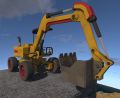 An Excavator
 Two Excavators breaking and collecting Stone, Coal, and ore.


